StitchWing Buy StitchWing

StitchWing 1.0 is here

Available now for PC and Mac

Friday, October 9 at 5:00 pm Eastern

Buy StitchWing

One purchase works on your PC or Mac.

Everything StitchWing does

Available for Windows 10 and 11 and for Mac (macOS 13 or newer). iPad version coming soon.

See it work

StitchWing in action

Short videos of the real app.

Turn a photo into a chart

1:11

From a photo to a finished chart: crop, craft and size, colors, the finished look, and a zoom into the squares.

Recorded in the app. Narration is a computer voice.

Photo: public domain.

StitchWing in action · 11 videos

More tutorials on our YouTube channel.

Everything after the graph

The graph was always the easy part.

Photo, chart, real yarn, written rows checked against the chart, and a pattern PDF with your name on it, all in one app that works offline.

A photo becomes a chart

Included in the free version.

Start from a photo, or several sharing one yarn list, and StitchWing draws the chart at your stitch’s real proportions. It can clear the background by color and keep faces sharper, all on your computer.

Little Sail as a chart: a cream sailboat with a navy mast and a gold hull, a gold sun and a navy sea, in squares.
    An illustration, not a screenshot. The picture is a drawing, not a photo.

    Every color, a real yarn

    Included in the free version.

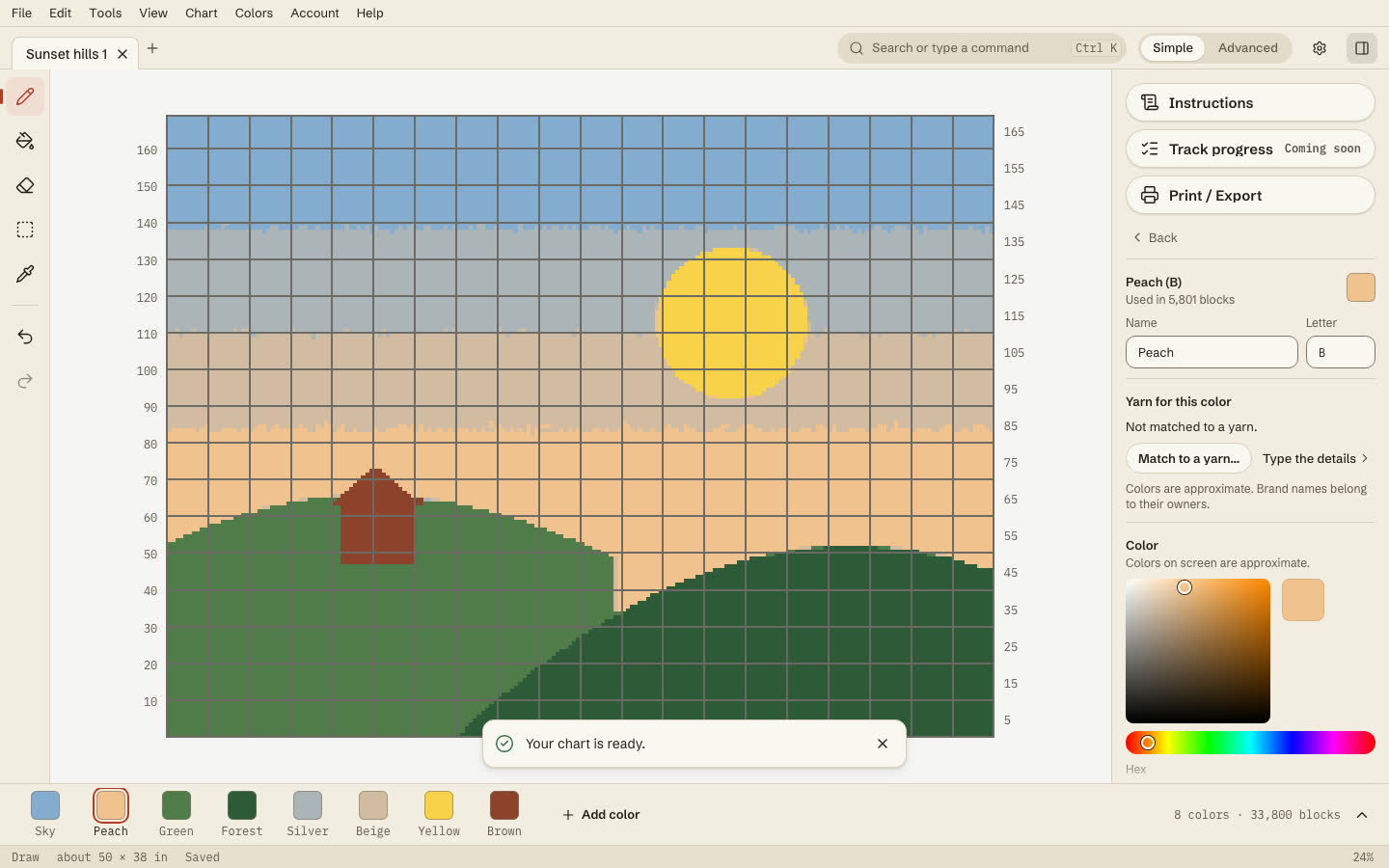
    Switch on Match to real yarn when you chart a photo, and every color becomes a real shade from a real yarn line, with its name and number.

    StitchWing with a sunset chart open in the editor, with the Yarn for this color panel offering Match to a yarn or Type the details, and the note that colors are approximate and brand names belong to their owners.
    A screenshot of the app. Colors on screen are approximate.

    61 yarn lines, 4,004 shades still made.

    See every yarn line
    • Baby Bee Sweet Delight
    • Bernat Blanket
    • Bernat Premium
    • Bernat Softee Chunky
    • Bernat Super Value
    • Caron One Pound
    • Caron Simply Soft
    • Cascade Yarns Cascade 220
    • DROPS Alaska
    • DROPS Paris
    • Hayfield Bonus DK
    • Herrschners Worsted 8
    • Herrschners Worsted 8 Baby
    • Herrschners Worsted 8 Wildflowers
    • Hobby Lobby I Love This Cotton
    • Hobby Lobby I Love This Yarn
    • Hobby Lobby I Love This Yarn Print
    • Hobby Lobby I Love This Yarn Sport
    • Knit Picks Brava Bulky
    • Knit Picks Brava Sport
    • Knit Picks Brava Worsted
    • Knit Picks Dishie
    • Knit Picks Palette
    • Lily Sugar'n Cream The Original
    • Lion Brand 24/7 Cotton
    • Lion Brand Basic Stitch Anti-Pilling
    • Lion Brand Heartland
    • Lion Brand Pound of Love
    • Lion Brand Vanna's Choice
    • Lion Brand Wool-Ease
    • Lion Brand Wool-Ease Thick & Quick
    • Loops & Threads Impeccable
    • Loops & Threads Soft Classic
    • Paintbox Yarns Cotton Aran
    • Paintbox Yarns Cotton DK
    • Paintbox Yarns Simply Aran
    • Paintbox Yarns Simply Chunky
    • Paintbox Yarns Simply DK
    • Premier Yarns Anti-Pilling Everyday Worsted
    • Premier Yarns Basix Worsted Solids
    • Red Heart Soft
    • Red Heart Super Saver
    • Red Heart With Love
    • Scheepjes Cahlista
    • Scheepjes Catona
    • Scheepjes Colour Crafter
    • Scheepjes Softfun
    • Scheepjes Stone Washed
    • Stylecraft Life DK
    • Stylecraft Special Aran
    • Stylecraft Special Chunky
    • Stylecraft Special DK
    • Yarn Bee Cozy Occasion
    • Yarn Bee Eternal Bliss
    • Yarn Bee Soft & Sleek
    • Yarn Bee Soft & Sleek Chunky
    • Yarn Bee Soft Secret
    • Yarn Bee Sugarwheel Cotton
    • Yarn Bee True Colors
    • Yarn Bee Velvety Smooth
    • Yarnsmiths Create DK

    Shade names and numbers come from each maker’s published list, or its official store. Where none is published, the store’s item number is shown and marked as one.

    Yarn brand, line and shade names belong to their owners. Colors on screen are approximate.

    Every row written for you, and checked

    Comes with the paid plans.

    StitchWing writes the rows for C2C, graphghan, knitting, beads, weaving and more, and checks every row’s count against your chart before it’s written out. Move a motif and they’re written and checked again.

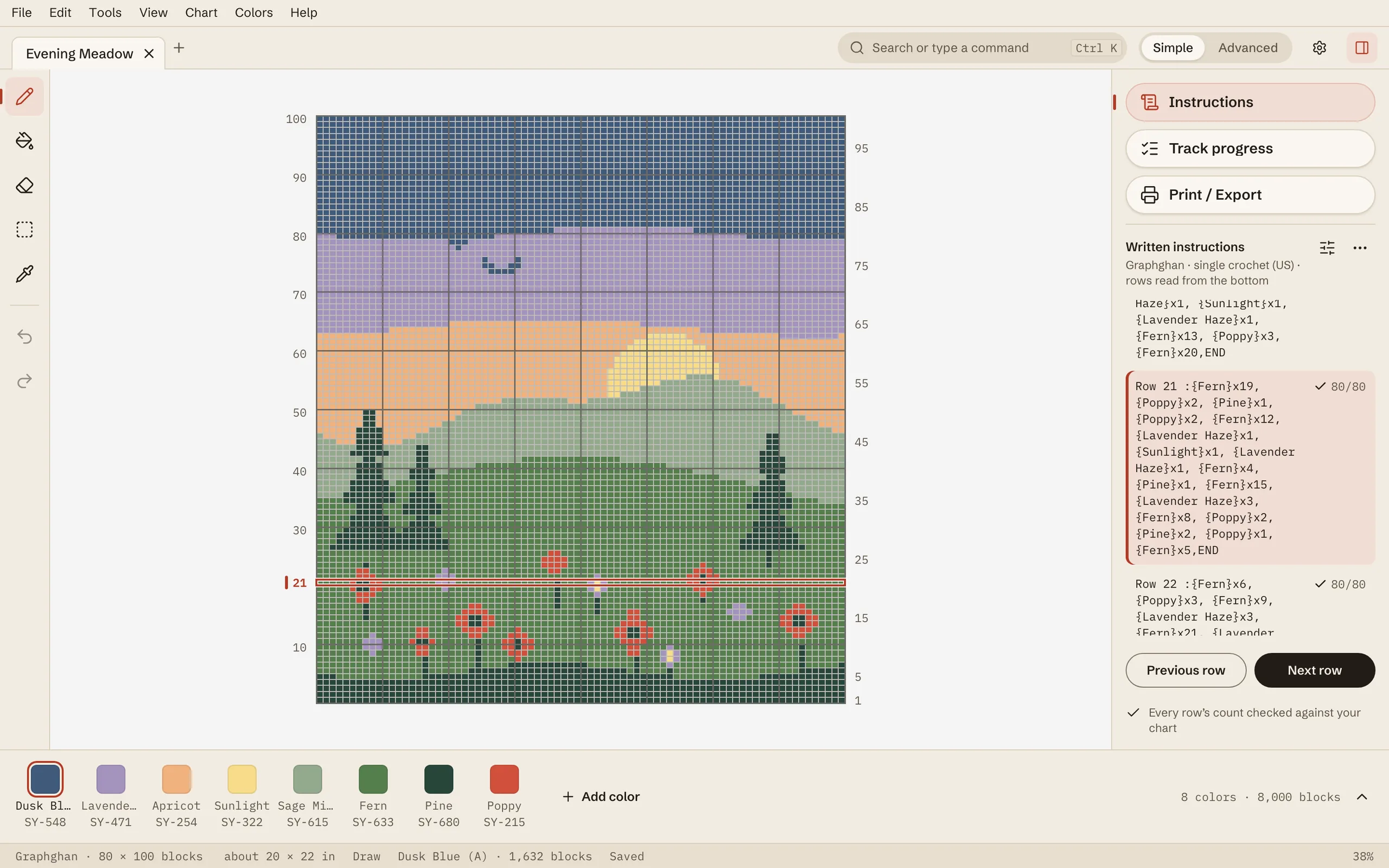
    The Written instructions panel in StitchWing: row 21 of a graphghan, written out color by color, is highlighted, and its count reads 80/80 with a check mark.
    A screenshot of the app: row 21, checked against the chart (80/80).
    See all 39 written rows as plain text, and check our counts

    These rows are worked out from the Little Sail chart when the page loads and checked tile by tile. A row that didn’t match would be marked instead of getting a check.

    Written C2C rows for the Little Sail example chart, 20 by 20 tiles, starting bottom-right.
    RowShapingReadColors, in orderTilesChecked

    See it finished before you start

    Included in the free version.

    View → Finished look draws your chart as worked-up stitches, beads or drills, in your colors. You can keep drawing while it’s on.

    • C2C crochet: the Little Heart Square, a red and pink heart on cream inside a dark border, drawn as worked-up stitches.

      C2C

    • Knitting: a Fair Isle colorwork band, drawn as worked-up stitches.

      Knitting

    • A graphghan of nested diamonds in oat, teal, rust and mustard, drawn as worked-up stitches.

      Graphghan

    • Cross stitch on aida: a sun over two green hills, drawn as worked-up stitches.

      Cross stitch

    • Peyote beadwork: a chevron in glass beads, offset every other column, drawn as worked-up stitches.

      Peyote

    • Brick stitch beadwork: a chevron, offset every other row, drawn as worked-up stitches.

      Brick stitch

    • Loom beadwork: a chevron on a straight grid, drawn as worked-up stitches.

      Bead loom

    • Diamond painting: a flower in faceted drills, drawn as worked-up stitches.

      Diamond painting

    • Weaving: colored stripes in warp and weft, drawn as worked-up stitches.

      Weaving

    • Filet crochet: a heart in blocks and spaces, drawn as worked-up stitches.

      Filet

    • Granny pixels: a checkerboard of granny squares, drawn as worked-up stitches.

      Granny pixels

    Finished looks drawn by StitchWing from charts. Previews, so colors and texture are approximate.

    A pattern PDF with your name on it

    The PDF is free. Its written rows come with the paid plans.

    One PDF with a cover, materials, the chart in color, a key, the written rows and a copyright page, plus an optional black-and-white sheet. Your exact yarn, with a Lot # column, is on the Materials page.

    Page 2 of 7Materials. Your exact yarn for every color, with tile counts, estimated skeins and a Lot # column for dye lots.

    Sample pattern: the Little Sail chart from above. “Your Studio Name” is a placeholder. An illustration, not a screenshot.

    Your shop pictures, done

    Comes with the paid plans.

    Finish a pattern and the listing pictures are ready: a cover with the finished look, a watermarked peek at the chart and a color card. Add a copy for each buyer with their name on it.

    Three square listing pictures made by StitchWing’s Shop pictures. In front: the Little Heart Square’s finished look with its title and the words Digital preview.
    Pictures made by StitchWing’s Shop pictures. Colors are approximate.

    The full list

    And everything else.

    Each line shows whether it’s in the free version, both paid plans, or All Access only.

    What’s new

    Charting

    • Simple mode: draw, fill, erase, select, undo.Free
    • Right-click or press and hold a square or selection to erase or recolor it.Free
    • Advanced mode: borders, backstitch, fractional stitches, palette tools.Paid
    • A full text box: align, space and turn it to any angle.Free
    • Layers, including a tracing photo that never prints.Free
    • Clip art: hearts, flowers, animals, holiday shapes and borders, shaped to your craft and dropped onto its own layer.Paid
    • Paste onto a layer of its own, then move, turn or flip it, now or later.Free
    • Draw your own alphabet in the font maker (Advanced mode).Paid
    • Fonts: the ones that come with the app, the ones on your computer, and your own font files (.ttf, .otf, .woff, .woff2). Every font shows your words stitched at your size, and the smallest size where it stays clear.Free
    • Browse Fonts: about 2,000 more Google Fonts, filtered and sorted for stitching, downloaded when you get one, then offline.Paid
    • Outline a whole design, a shape or a selection on its own layer, and add outline and shading to text and shapes. Outlining by hand is free.Paid
    • Gradients: 50 ready-made or make your own with as many colors as you like; drag one across the chart, or fill text and shapes with it.Paid
    • Select a thing: click it in your chart and all of it is selected.Paid
    • Mark “no stitch” areas for armholes and necklines; the rows say where to stop.Marking: Free
    • Tidy rows and colors: tidy specks and ragged edges, Gentle to Strong.Free
    • Move a motif, and the rows are rewritten and rechecked.Paid
    • Other sizes: baby, throw, twin, queen from one design.Paid
    • Pattern maker: draft charts and written rows from your measurements and colors. Needs a paid plan; Premium Templates are bought separately (existing customers keep their templates). Varsity jackets, pullovers, a men’s cardigan, hats, scarves, ponchos and lounge pants. Coming soon: the newborn pullover, and women’s pullovers and cardigans. Also coming soon: construction choices for varsity jackets. Dress, Overalls, Skirts and Zip-Up Hood Hoodie are available to buy inside the pattern maker. Charts face the way the garment is worn, and every size can be exported in one pattern. Check your pattern and make a gauge swatch before you start. See Pattern maker help.Paid
    • Name-and-date templates buyers fill in (set up in Advanced mode).Filling in: Free
    • Light and dark themes.Free
    • Highlight one color to check its lines are closed, with gaps marked.Free

    Crafts

    • C2C from any corner, left-handed flip, dc, hdc or sc tiles.
    • Graphghan, tapestry, mosaic, filet, Tunisian and granny pixels.
    • Fair Isle and intarsia knitting, flat or in the round.
    • Cross stitch, with backstitch and fractional stitches in Advanced mode.
    • Diamond painting, on the square-drill grid.
    • Beadwork: loom, square stitch, peyote and brick (flat only).
    • Weaving, counted in warp ends and weft picks.

    Written rows are written for C2C, graphghan, tapestry, Tunisian, filet, granny pixels, knit, bead loom, peyote, brick and weaving. Mosaic, cross stitch and diamond painting are worked from the chart.

    Photos and files

    • Several photos in one chart, sharing one yarn list.Free
    • Clear the background by color.Free
    • Find the subject and remove the background: the dog, not the sofa.Paid
    • Just one thing: click what you want, and only that is charted.Paid
    • Line drawing: just the lines, in one color, one stitch wide.Paid
    • Sharpen a small logo or cartoon first, for cleaner edges.Paid
    • Remove something: paint out a date stamp or a stray object in the photo.Paid
    • Keep details: faces hold their shape (check the eyes).Free
    • Paste a picture straight from your clipboard: turn it into stitches on its own layer, a new chart, or a tracing photo.Free
    • Open DST, PES, JEF, VP3, HUS and EXP embroidery files (a close copy).Free
    • .pat and .chart charts open from other programs. Above the free size limit, imported charts open to view only. See Opening charts help.Free
    • Add rows and columns…: add blank space on any chart edge with a preview and one Undo. See help.Free
    • Chart notes: read, copy or edit the notes in your chart, and print them after the cover. Notes come across from formats that carry them, including .PAT designer notes. See Chart notes help.Free
    • Bring in a PDF chart: read a PDF or a photo of a printed chart back into a chart you can edit, with its grid, key and colors. Also reads black-and-white symbol photos.Paid
    • Read the key’s names straight from your photo (OCR), instead of typing them in.Paid
    • Closing with unsaved work asks first, and after a crash your unsaved work is offered back.Free

    Color and yarn

    • The closest shades to any color, nearest first, or one yarn line for the whole chart (approximate). Discontinued shades are marked “no longer made”.Free
    • Match to my skein and measure my swatch from a photo, with stitch and row count suggestions (approximate; check counts against your own gauge swatch).Paid
    • Yarn amounts in whole skeins, from your swatch, or a typical estimate before you've made one. The shade names and stitch counts stay free.Paid
    • My yarn: chart from the yarn you own, including embroidery thread and beads, with dye lots per skein and a warning when one lot won’t cover a color.Paid
    • What a piece costs: yarn prices plus your time.Paid
    • Check colors for color-blind eyes (simulated, approximate).Free
    • Colorways: several named color sets for one chart — switch between them any time, and the palette strip, Materials, written instructions and printed key all follow. Print / Export can print one colorway or all of them.Paid

    Patterns and selling

    • Side to side: work a graphghan or tapestry chart turned on its side, so each column is a row. Optional, asked once.Paid
    • Written rows your way: Braced, letters, yarn names.Paid
    • An abbreviations key above the first row, with only the terms that pattern uses.Paid
    • US or UK stitch terms, anywhere in the app.Free
    • Written rows in six more languages.PaidPreview
    • Big charts tile across pages, with an overlap you set.Free
    • Fill the page: chart pages packed full of big, readable squares. Untick it for the original layout.Coming soon
    • Save your chart as a PNG, or a JPEG to share.Free
    • Your logo and business name on what you export.Free
    • A copy for each buyer, with their name on it.Paid
    • A time-lapse video of your project.Paid
    • Send to testers: a private link to a chart for each tester, with notes they can pin to a row or a stitch.Paid
    • Check a leaked copy.Free
    • Template Store: blank size templates, and StitchWing Premium Templates (garments), bought one at a time in the app. Premium Templates need a paid plan to use the pattern maker. Existing customers keep the templates they have.Sold separately

    At your hook

    • Read rows aloud, hands-free, with a page-turner or your voice: say “next”.Paid
    • Track progress on charts: the current row lit up, done rows dimmed, with the row's words right there.Paid
    • Follow along on your phone: the current row, kept in sync with the app.Paid
    • Open pattern PDFs you own. Ticking pages off is paid.Reading: Free
    • Works offline, and your files never lock.Free
    • On a Windows PC or a Mac: one purchase works on either, at the same price.Every plan
    • The free version needs no account or card and is yours to keep.Free
    Coming soon

    In a future update

    • iPad version coming soon

    See the app

    The real app, as it is today.

    Screenshots of StitchWing itself.

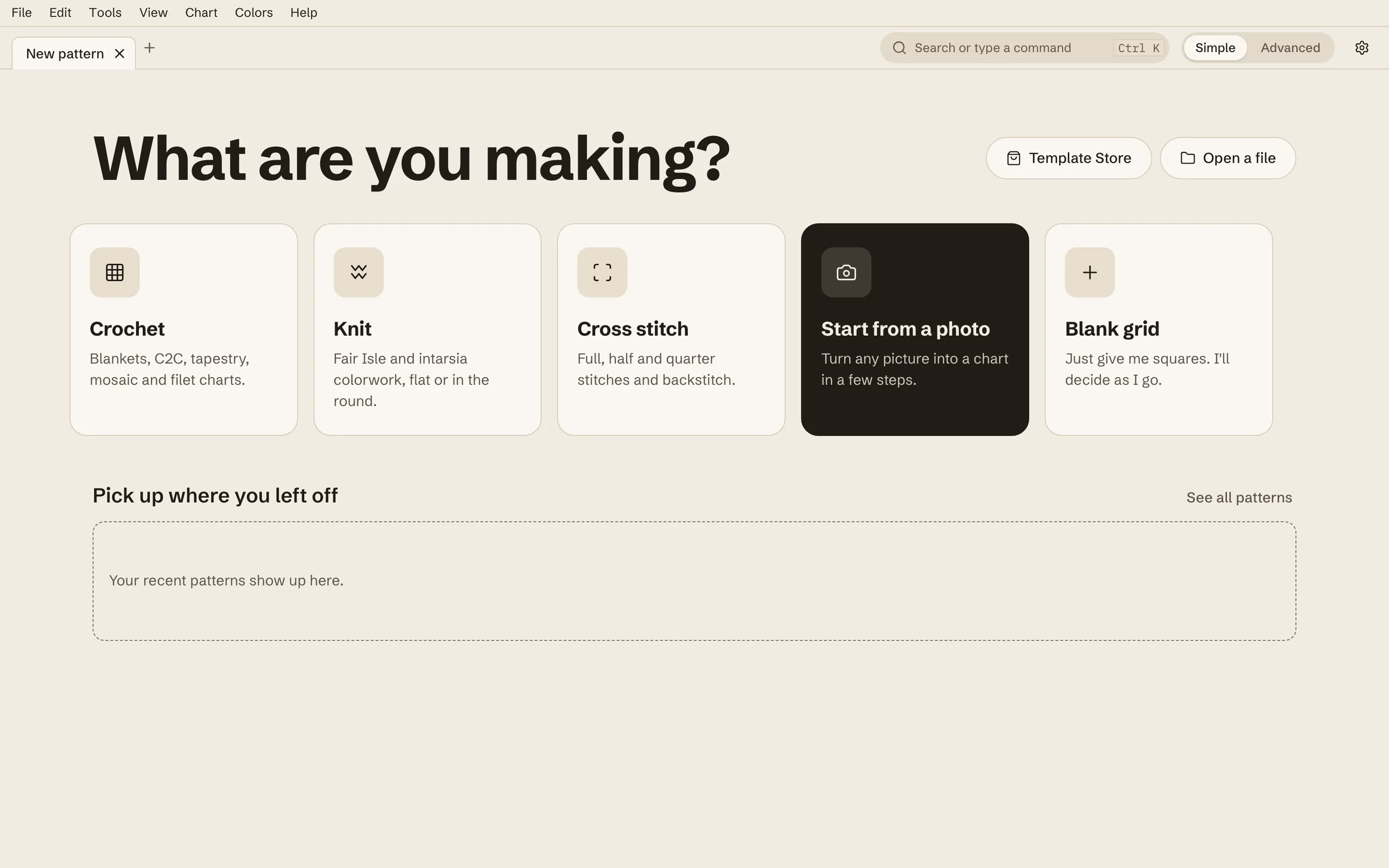
    The StitchWing Start screen. A dark list down the left side holds Home, Recent and Template Store, with Open a file and Bring in a PDF chart at its foot. Beside it a large heading asks “What are you making?”, above five cards: Crochet, Knit, Cross stitch, From a photo and Blank grid. An empty Recent row waits for recent patterns.

    Start

    Pick what you’re making, or start from a photo or a blank grid.

    Full size screenshot of the Start screen
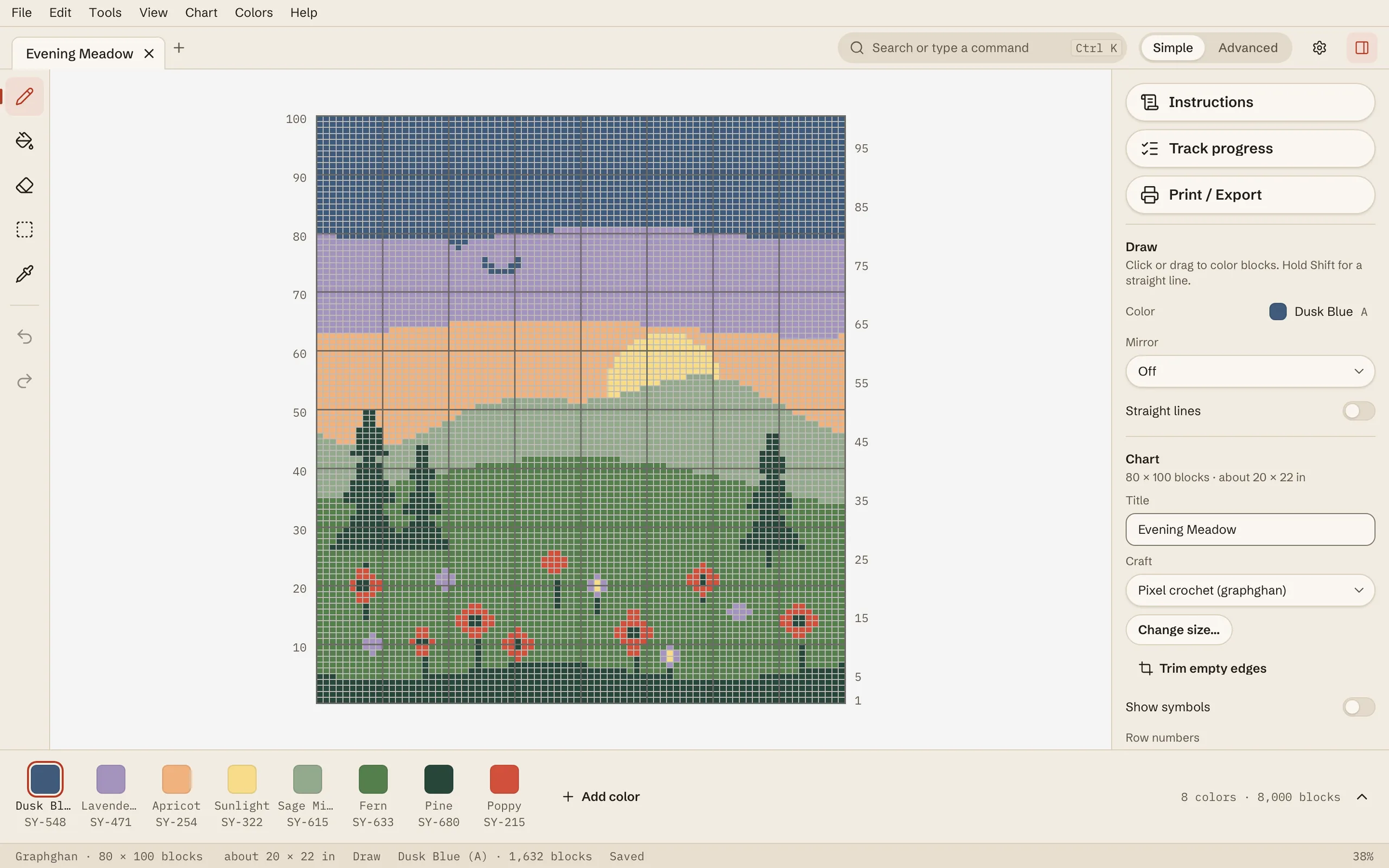
    The editor in Simple mode with the light Linen theme. The chart is Evening Meadow, 80 by 100 blocks: a dusk-blue and lavender sky, a low yellow sun, green hills, dark pine trees and red poppies. The tools run down the left edge, eight yarn colors sit in the palette strip at the bottom, and the right panel has Instructions, Track progress and Print / Export buttons above the Draw and Chart options.

    The editor

    Simple mode keeps to the tools you use most.

    Full size screenshot of the editor
    The same chart with the Instructions panel open, written in the Braced format. Row 21 is outlined on the chart and highlighted in the panel: “Row 21 :{Fern}x19, {Poppy}x2, {Pine}x1, …,END” with a check mark and 80/80. Previous row and Next row buttons sit below the rows, above the note “Every row's count checked against your chart”.

    Written rows, in your format

    The Braced format, with every row's count checked against the chart (80/80); written rows come with the paid plans.

    Full size screenshot of the written rows
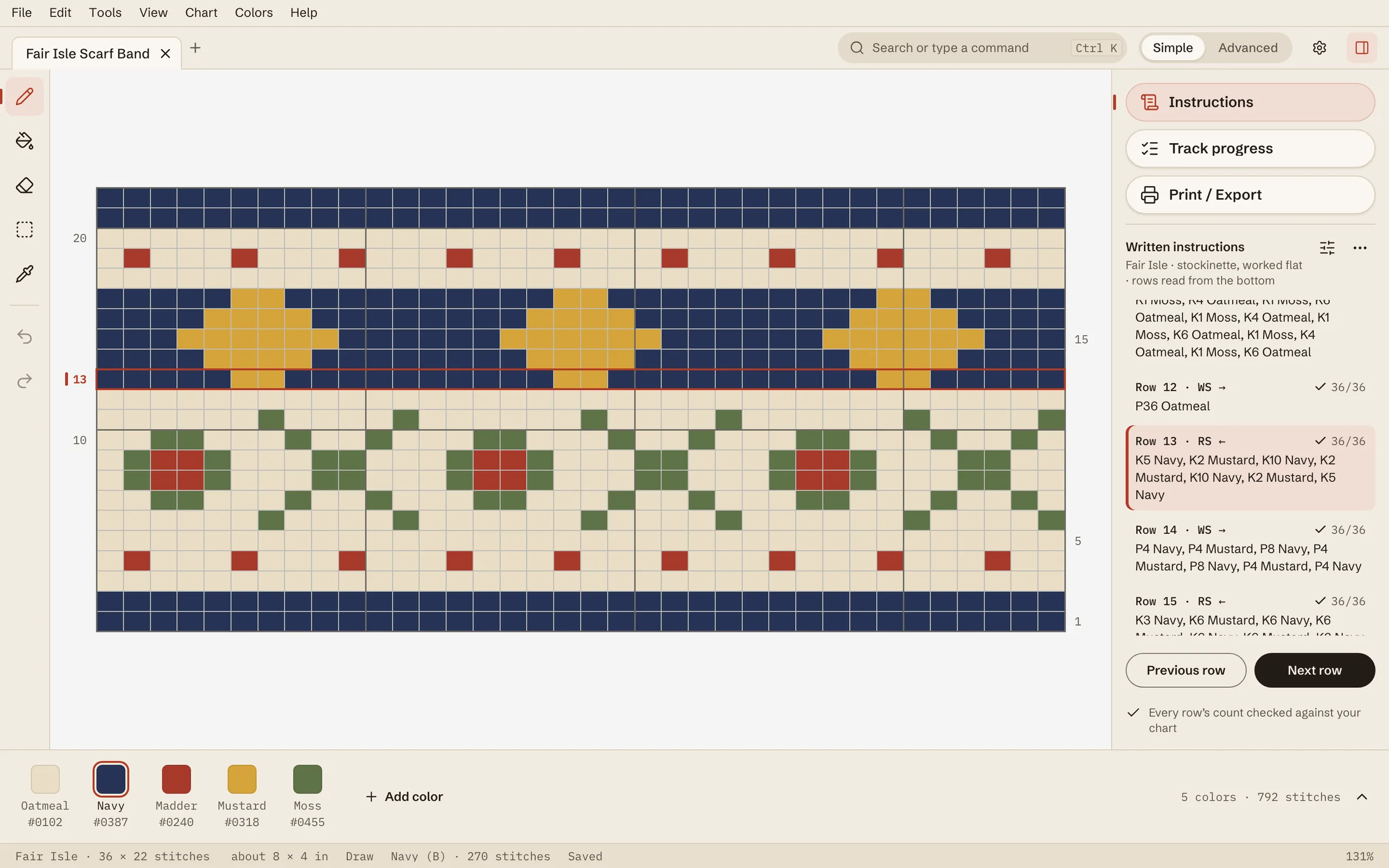
    A Fair Isle Scarf Band chart, 36 by 22 stitches in navy, oatmeal, madder red, mustard and moss green, with row 13 outlined. The Instructions panel is written in knit terms, for example “Row 13 · RS ←: K5 Navy, K2 Mustard, K10 Navy…” and “Row 14 · WS →: P4 Navy, P4 Mustard, P8 Navy…”, each with a 36/36 check.

    Knit rows

    Knit patterns are written in knit terms, and every row is checked against the chart (36/36).

    Full size screenshot of the knit rows
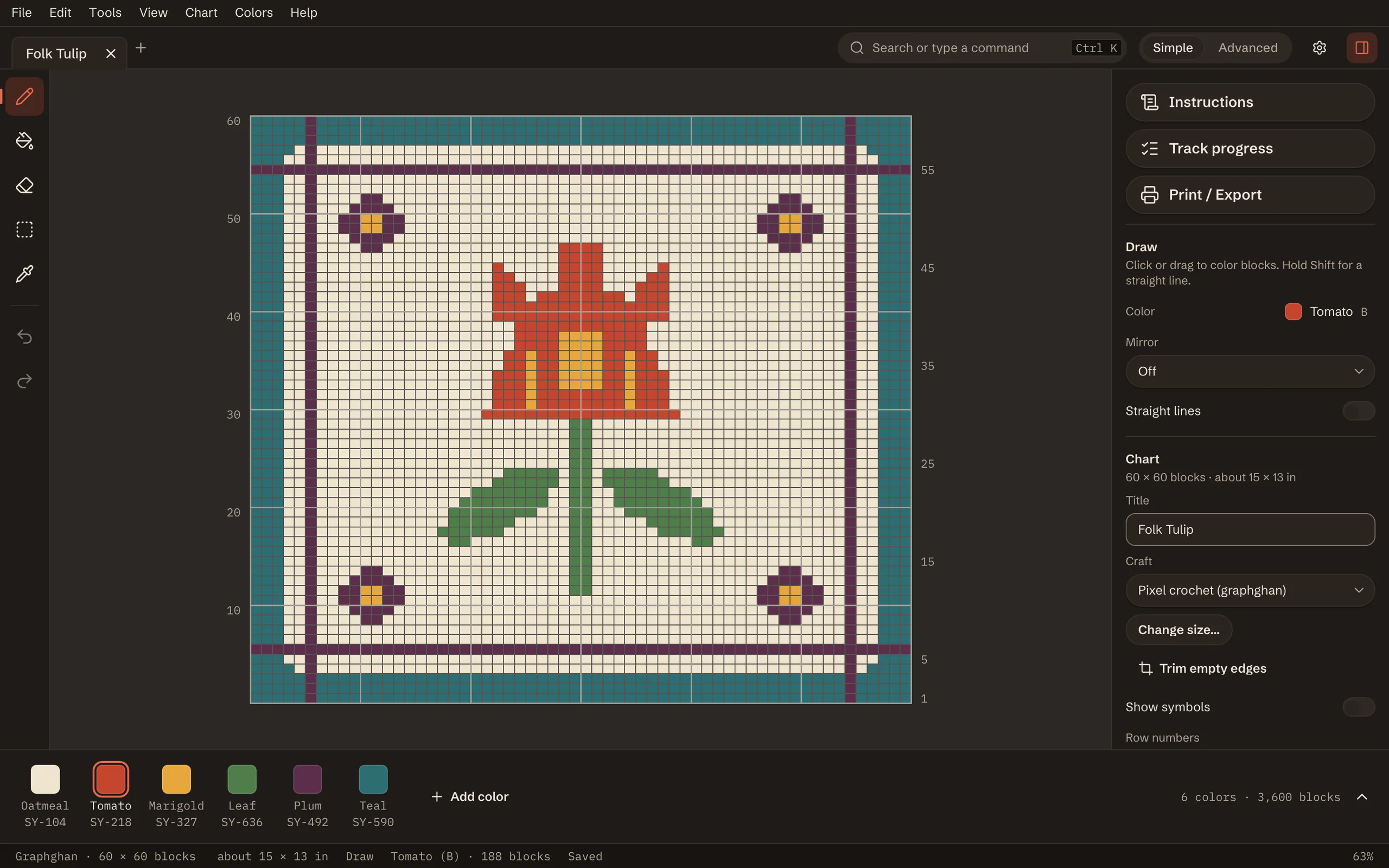
    The editor in the dark Charcoal theme. The chart is Folk Tulip, 60 by 60 blocks: a red tulip with green leaves on an oatmeal ground, framed by a teal and plum border, with small plum flowers in the corners.

    The Charcoal theme

    Charcoal, the dark theme.

    Full size screenshot of the Charcoal theme

    Screenshots from September 2026; newer features aren’t in them yet, and the patterns and yarn names in them are samples.

    More questions

    Is there a free trial?

    No. The free version is the way to try StitchWing, for as long as you like. Its limits are on the buy page; a paid plan unlocks the rest.

    Does StitchWing save my work by itself?

    StitchWing keeps a recovery copy as you work, but it’s a safety net, not a guarantee: a crash or power cut may lose recent changes. Use Save to keep your work. Closing a chart with unsaved work asks Save, Don’t save or Cancel.

    Are the “Coming soon” features included in what I buy?

    Plans get new features as they ship. Own It includes every feature in StitchWing 1.0, yours to keep, including the photo tools. After that, Own It gets security and maintenance fixes; anything added after release comes with All Access, monthly or yearly, or as a paid upgrade once one exists. We don’t give dates for planned features, and this page marks plainly which ones are coming soon.

    Can I open the charts I already made in another program?

    .pat and .chart files open now, square for square: the grid, the thread colors with their brand names and numbers, and the backstitch outline. They open as a new StitchWing pattern; your original file stays unchanged. Use Save to keep a .stitchwing copy.

    On the free version, an imported chart above the chart-size limit opens View only: no editing, printing or exporting. Charts made in StitchWing still open to view and print. If StitchWing says something was left out, compare the chart with your original before you start. See Open charts from other programs.

    Check half stitches: some may arrive mirrored, and two halves along one diagonal arrive as one whole stitch. A .chart file comes in as a graphghan without designer details or notes, and some .chart files are locked by the program that wrote them.

    Visit the help center

    Page 2 of 7Materials

    Sample pattern · Illustration of the PDF, not a screenshot